 Twinsub
Local vs cloud transcription
To subtitle a video, recognition can run on your computer or on a server you upload the file to. People use both. The differences are in privacy, cost, speed and how much you depend on the network.
The difference in one sentence
Local transcription: the model is installed on your Mac and the audio never leaves it. Cloud transcription: the audio or video is sent to a provider's server, recognized there, and the text comes back.
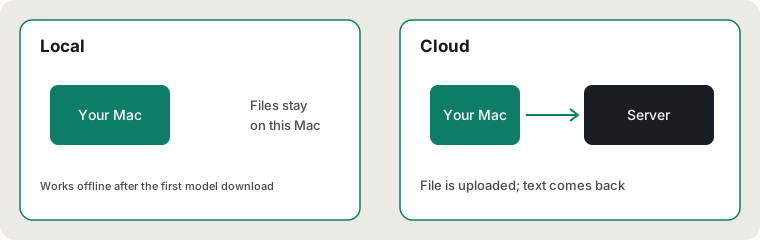
Four ways to compare
| Local | Cloud | |
|---|---|---|
| Privacy | The file stays on your Mac. Suits unreleased interviews, internal training and client footage | The file is uploaded. Whether it is kept and how it is used depends on the provider's policy, which you need to read yourself |
| Cost | Models are free to download; prices of the tools differ, from one-time purchases to free open source. It uses your own computer's power | Commonly billed per minute or by subscription, so the more you use, the more you pay |
| Speed | Depends on the machine. Apple silicon Macs use Metal acceleration; older or low-memory machines are slower | Depends on your upload speed and the server queue; uploading a long video takes time by itself |
| Connectivity | Needs a connection once to download the model, then works offline | Needs a connection every time |
What local costs you
- Disk and memory: speech models are files of a few hundred MB to several GB.
- Waiting for your own machine: while it works, the computer runs warmer and the fans may spin up.
- Features limited by the machine: cloud services sometimes add speaker separation, glossaries or team collaboration that a local tool may not have.
What Twinsub does specifically
- Recognition: Whisper large-v3-turbo, run locally through whisper.cpp (whisper.cpp and the Whisper models are both MIT licensed).
- Translation: the on-device translation built into macOS. The first time you translate a language, the system may ask you to download its language pack; after that it runs offline.
- The network is used in two places only: the one-time speech model download, and macOS downloading language packs. Videos and subtitles are never uploaded.
- The app sends anonymous usage events (success or failure, duration, system version) with no file names or subtitle text; you can turn them off in Settings. See the Privacy Policy.
How to choose
- Content that must not leave your hands, or long videos with many cues: prefer local.
- A low-spec computer and only the occasional short clip: cloud is less effort, but read the service's privacy terms first.
- Already paying for an editor with built-in captions: use that; there is no need to switch.
Updated 2026-10-11. Back to the Twinsub home page